Governed AI
AI you can turn on in a validated environment.
traceunified's AI is a governed advisory layer. The agents analyze and propose — they never write to your records. A human applies every change through the normal signed, audited workflow. Advisory by design, license-gated, fail-closed, and fully auditable.
The principle
AI that proposes. People decide. Every change on the record.
In a validated environment, the integrity of the requirement, its version history, and the e-signature chain is the whole point. An AI that autonomously edited items would break exactly the thing you are protecting.
So traceunified does the opposite. The agents hand a person a recommendation, and the person decides. The compliance record only ever changes by human action, on the audit trail — the same way it does today. Everyone will say they have AI. The difference is AI you can actually turn on inside a Part 11 environment.
Built for cautious buyers
Every AI objection, answered by the architecture.
No. The agents produce recommendations. A human reviews and applies every change through the standard workflow — versioned, signed, and audited. AI has no write path to the record.
Yes. Every governance change — enabling AI, switching an agent on, delegating to a project — is written to the Part 11 audit trail with the actor, the action, and the timestamp.
No. You bring your own model-provider key. There is no shared traceunified "AI brain" sitting over your tenant data.
Then it cannot be turned on. AI is a licensed, entitlement-gated capability, enforced the moment you enable it and again at runtime.
How it is governed
Fail-closed by default. Five gates, every one off until you say so.
A brand-new organization has AI fully off at every level. Reaching an agent that can run means clearing a layered chain of controls, every one of which defaults to off.
- 1 License entitlement
Your organization must hold an active license that includes AI. No entitlement, no AI — full stop.
- 2 Organization master switch
A single org-level on/off, off by default. Nothing downstream can run until it is on.
- 3 Per-agent control
Each agent is individually Off, On, or Delegated. "Delegated" hands the on/off decision down to individual projects.
- 4 Per-project override
When an agent is delegated, each project decides for itself — so control can be centralized or distributed deliberately.
- 5 Bring your own key
Even with everything above enabled, an agent will not run until your own model-provider key is configured. Keys are held as write-only secret references in a managed secrets store (AWS Secrets Manager / KMS) — never in plain application settings.
The agents
Advisory agents for requirements, quality, and architecture.
In every case the output is a recommendation — a person accepts or rejects it, and even that decision is captured on the audit trail.
Flags ambiguous, weak, or untestable phrasing and missing acceptance criteria.
Proposes a clearer, testable rewrite of an item — for a person to accept or reject.
Surfaces likely-duplicate or overlapping items before they fork your trace model.
Checks an item against a selected regulatory framework and reports what it finds.
OpenAI · Azure OpenAI · Anthropic · your own endpoint
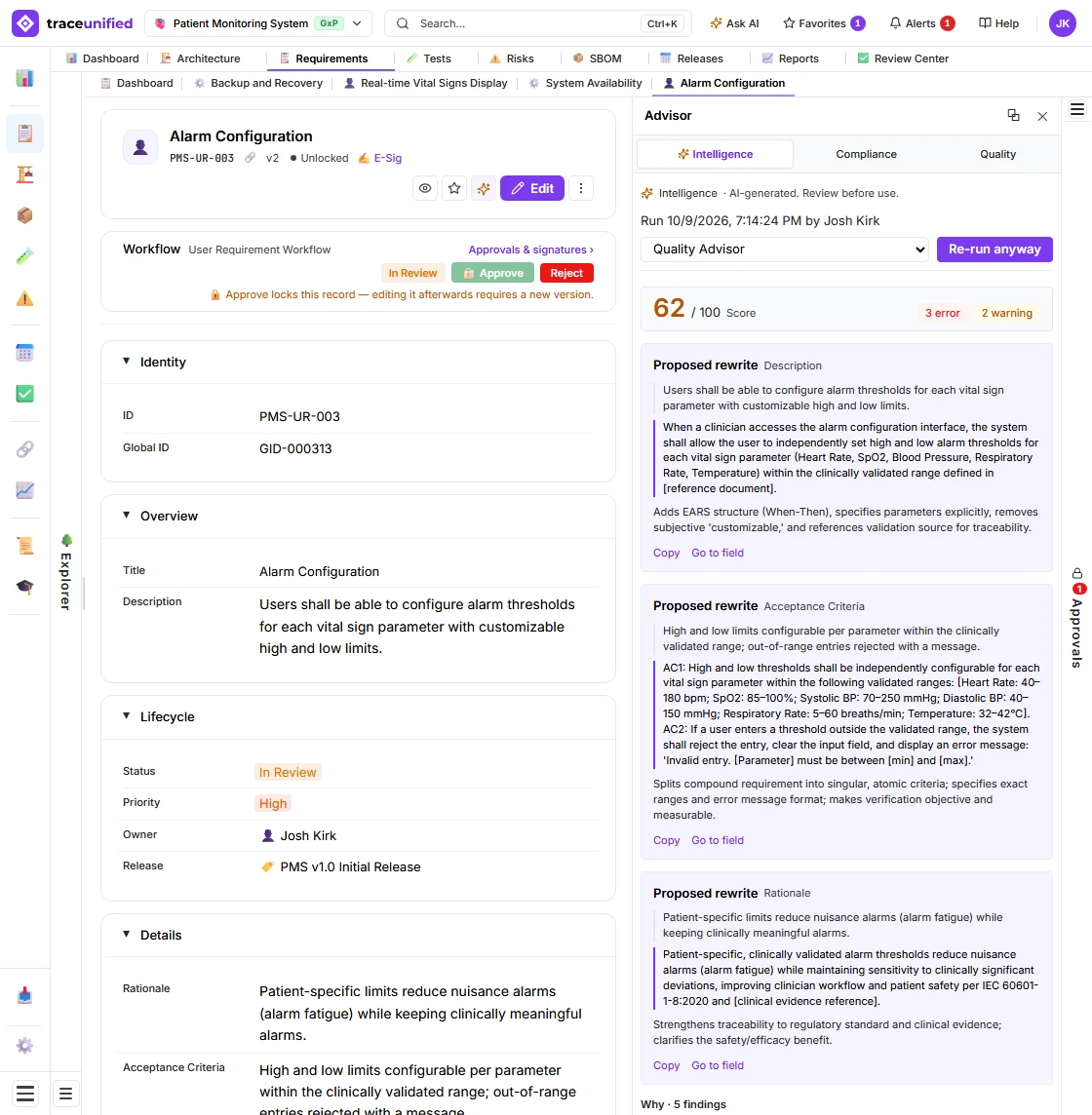
The architecture advisor
An advisor that reviews the whole model, not a sample of it.
The Architecture Reviewer sits beside the diagram canvas. Point it at a diagram or at the entire model and it reviews every element and relationship — then groups what it finds by rule, so a hundred instances of one problem read as one problem with a hundred fixes. Advisory like every agent: it proposes fixes; a person applies them.
Reviews every element and relationship on a diagram for SysML structure, decomposition, and traceability gaps. Large diagrams are reviewed in batches; nothing is truncated or silently dropped.
Reviews the whole model. The findings are computed from your data with exact counts — duplicate names under one owner, unowned ports and parts, unreferenced interface blocks, orphans, placeholder names — and the model only explains them.
One finding per rule, not per element: "16 actors have placeholder names" lists the sixteen, each with its own fix. Severity is capped by the kind of rule, so a naming issue is never an error.
The review score is computed from the findings by a published formula, never guessed by the model — and a review that did not cover everything shows no score at all.
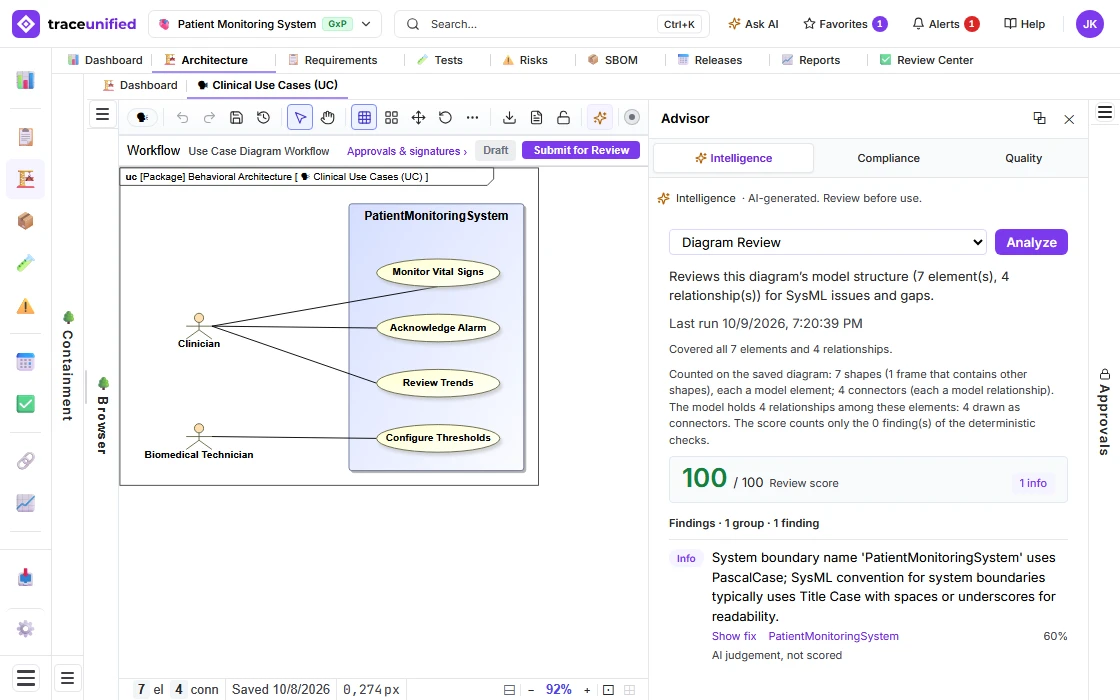
The assistant
A governed assistant that reads your whole model.
Ask it about coverage, suspect links, or the impact of a change, and it answers from your real traceability data — never a guess. It reads the record and proposes; it never writes to it. Governed, fail-closed, on a model you bring.
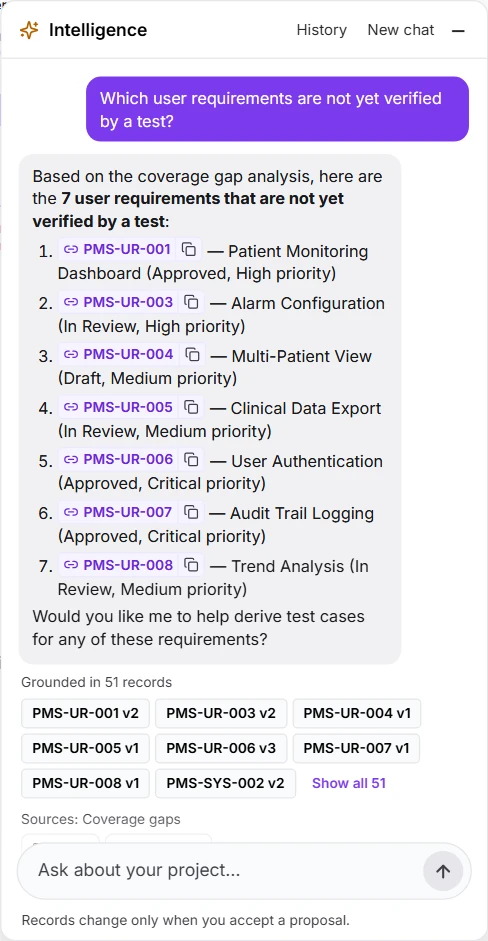
Coverage, the traceability matrix, suspect links, and the impact of a change — answered from your project, not guessed. Name an item the way you would, by its display ID in any case, and it reads only what you are allowed to read.
Ask it for an architecture and it proposes the SysML blocks, ports and flows a requirement implies, drawn as the diagram Accept will create. It drafts requirements, test cases and risk controls the same way: a proposal you accept, edit, or reject.
Generate a matrix or coverage report on demand. The assistant reads and proposes; a person makes every change, on the audit trail.
The derivation engine
Derive the whole thread from your requirements.
The assistant reads your model. The derivation engine builds on it. Point it at a set of requirements and it proposes the downstream work products they imply — tests, architecture, risks, an SBOM — each grounded in the sources it came from. Same governed principle: it proposes; you accept; the record only changes by human action.
Decompose high-level requirements into a structured child set.
Propose verification — test cases and a plan — for the requirements that need it.
Propose SysML model elements that realize the requirements.
Surface the actors implied by the requirements.
Propose failure modes as a structured FMEA — you assign the numbers.
Propose a component inventory from the model — you supply versions and hashes.
Three real runs on the demo project, each stopped at its proposal. Nothing shown here was accepted.
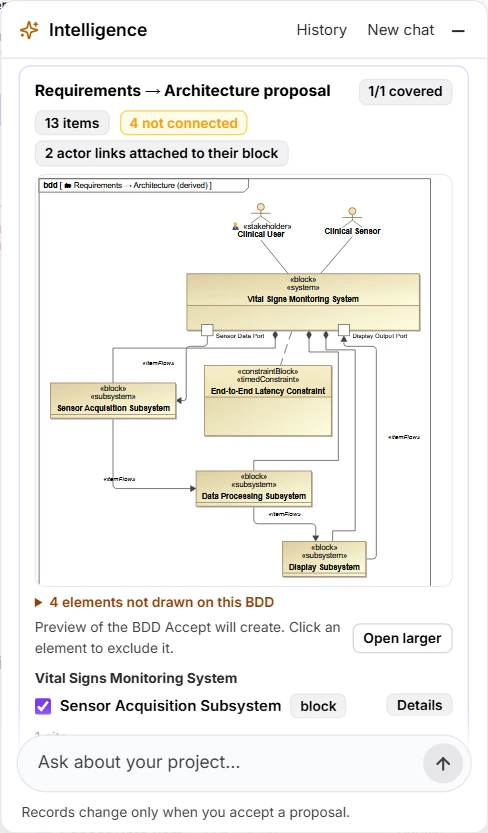
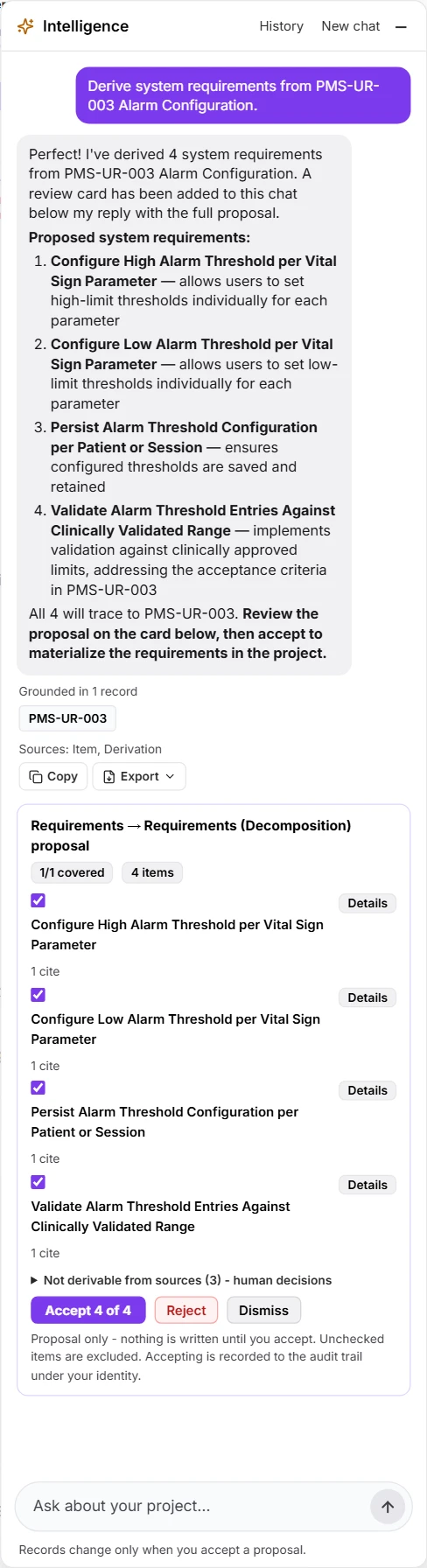
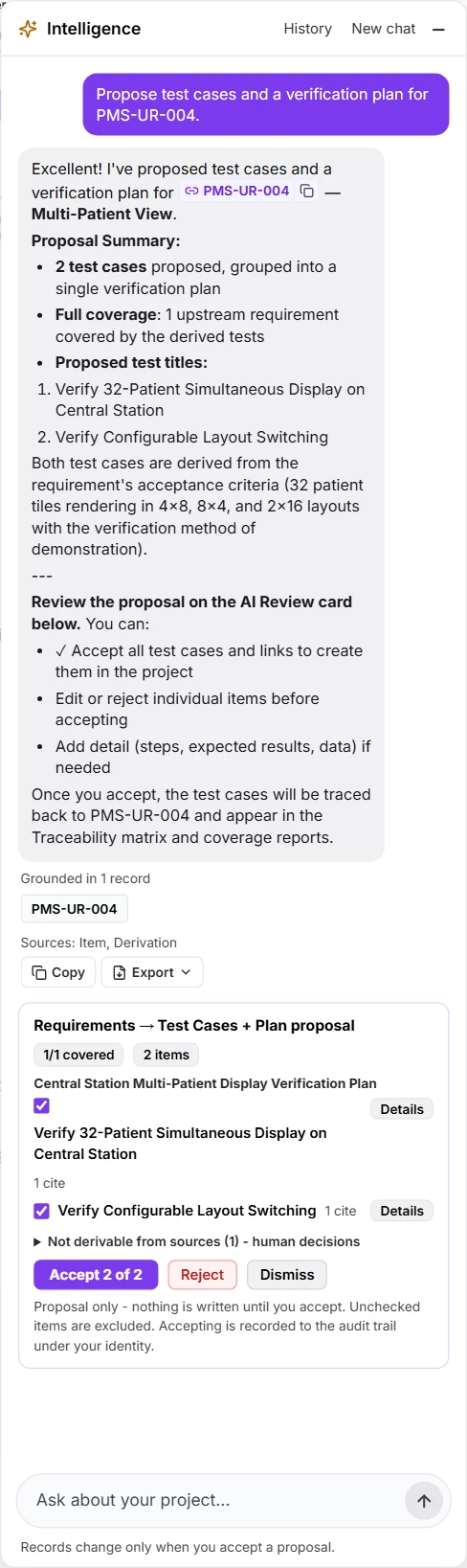
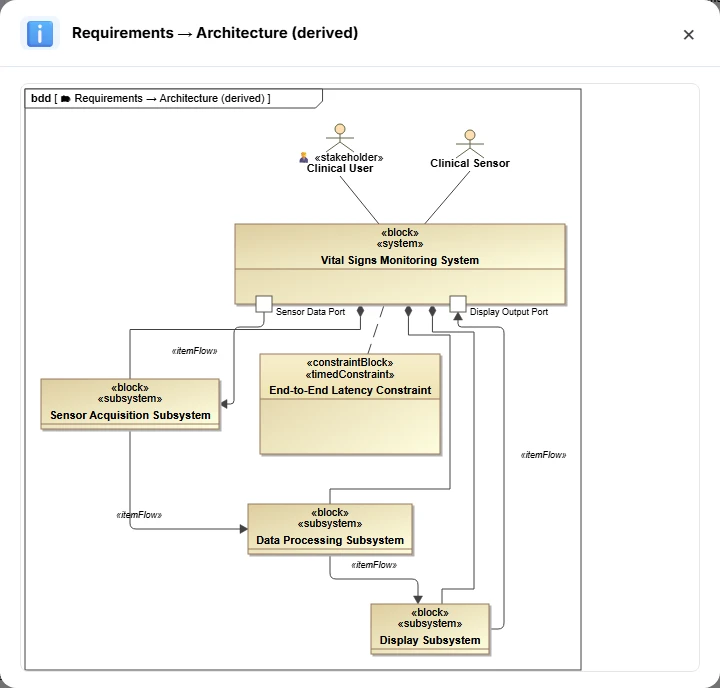
Every proposed item must cite a real source from your project — an id or display id that actually exists. Items that cite nothing, or cite something unknown, are marked invalid and never quietly kept. The AI cannot invent a source.
A derivation run returns a coverage ledger: which of your source items it could not drive a proposal from, and why. Silence never masquerades as completeness — an honest gap is required, not optional.
It structures an FMEA but will not fill in severity, occurrence, detection, or RPN. It builds a component inventory but will not fabricate versions, hashes, suppliers, or licenses. The AI proposes structure; your engineers own the numbers.
There is no cap on how many requirements a run reads. A run too large for one model call shows you its exact plan — sources, batches, calls — and waits for your go-ahead, then runs in the background. A batch that fails is reported, never hidden, and retried on its own.
How a run works
Scope, ground, derive, validate, propose — then you decide.
A derivation is a pipeline with the human at the end, not the model. Every run ends as a proposal; only your accept turns it into real, traced records.
- 1 Scope
You choose the recipe and the source items — a set of requirements, a slice of the model.
- 2 Ground
The engine gathers the real source records and the existing targets, so nothing is derived in a vacuum.
- 3 Derive
Your model proposes work products, citing the sources behind each one.
- 4 Validate
Citations are resolved, uncited items rejected, human-only fields stripped, duplicates of existing items suppressed.
- 5 Propose
The result lands as a proposal in the recommendation ledger — nothing is on the record yet.
- 6 You accept
In the workbench you accept all, some, or none. Only your accept materializes real, traced records — attributed AI-proposed, human-accepted, on the audit trail.
Questions
Governed AI, answered.
- What can the AI derive from my requirements?
- From a set of requirements it can propose a decomposed child set, test cases and a plan, SysML architecture elements, and the actors involved. From requirements and architecture together it can propose an FMEA. From the architecture it can propose an SBOM component inventory. Each is a proposal you review and accept — nothing is written for you.
- Can the AI invent requirements or sources that are not in my project?
- No. Every proposed item must cite a real source that exists in your project, by id or display id. Anything citing an unknown or missing source is rejected as invalid before you ever see it — grounding is enforced in code, not left to the model.
- Does the AI assign risk scores or SBOM hashes?
- No. Fields that are engineering judgments — FMEA severity, occurrence, detection, and RPN; SBOM version, hash, supplier, and license — are reserved for humans. If the model tries to fill them, they are stripped. The AI gives you the structure; you supply the judgment.
- When does a derivation actually change my project?
- Only when a person accepts it. A run produces a proposal in a ledger and stops there. Accepting materializes real records in a single all-or-nothing transaction, each attributed AI-proposed and human-accepted on the Part 11 audit trail. You can accept everything, a subset, or nothing.
- Is there a limit on how many requirements a derivation can read?
- No. A derivation reads every source you point it at. When a run is too large for a single model call, it tells you the exact plan — how many sources, batches, and model calls — and asks you to confirm before it runs as a background job. If a batch fails, the run says how much it covered, and a retry re-runs only the batches that failed.
- Can the AI review my architecture model?
- Yes. The Architecture Reviewer beside the diagram canvas reviews a whole diagram or the whole model. It covers every element and relationship, groups its findings by rule, and scores the result with a published formula — and it only proposes fixes. A person applies them.
- How are model-provider keys stored?
- As write-only secret references in a managed secrets store (AWS Secrets Manager / KMS) — never in plain application settings. The application can use a key to call your provider, but cannot read it back out.
- Can different projects use different AI settings?
- Yes. An agent can be set to Delegated, which hands the on/off decision to each project — so one project can use an agent while another keeps it off. Control is centralized or distributed by deliberate choice.
- Who pays for the model usage?
- You do. Because you bring your own provider key, model calls run on your own account — you hold the key and the cost, with no markup and no shared traceunified model in the middle.
- What does a reviewer see from an agent?
- A recommendation shown in context — a flagged requirement with a suggested rewrite, or a list of likely duplicates, for example. A person accepts or rejects it, and nothing reaches the record until they apply it through the normal signed workflow.
- Which model providers are supported?
- OpenAI, Azure OpenAI, Anthropic, or your own compatible endpoint — you bring the key.
Governed, advisory, auditable
AI that strengthens the record — and can never compromise it.
traceunified's AI is advisory only. It analyzes and recommends; it never writes to your controlled records. Access is gated by license entitlement and a layered, fail-closed control model, and every configuration change is recorded on the audit trail.
yourteam.traceunified.com